






A
Sound Sample Librarian/Cataloger/Tagger designed for Musicians,
Producers, Sound Engineers
Producers, Sound Engineers
- WavSniper is a no-fuss time-saving utility for easy tagging, and previewing, digital sound files (wav or mp3).
- When you are in a
creative mood, nothing spoils it more than having to search through
countless sub-diectories and sound file sample disks to find that perfect
sound.
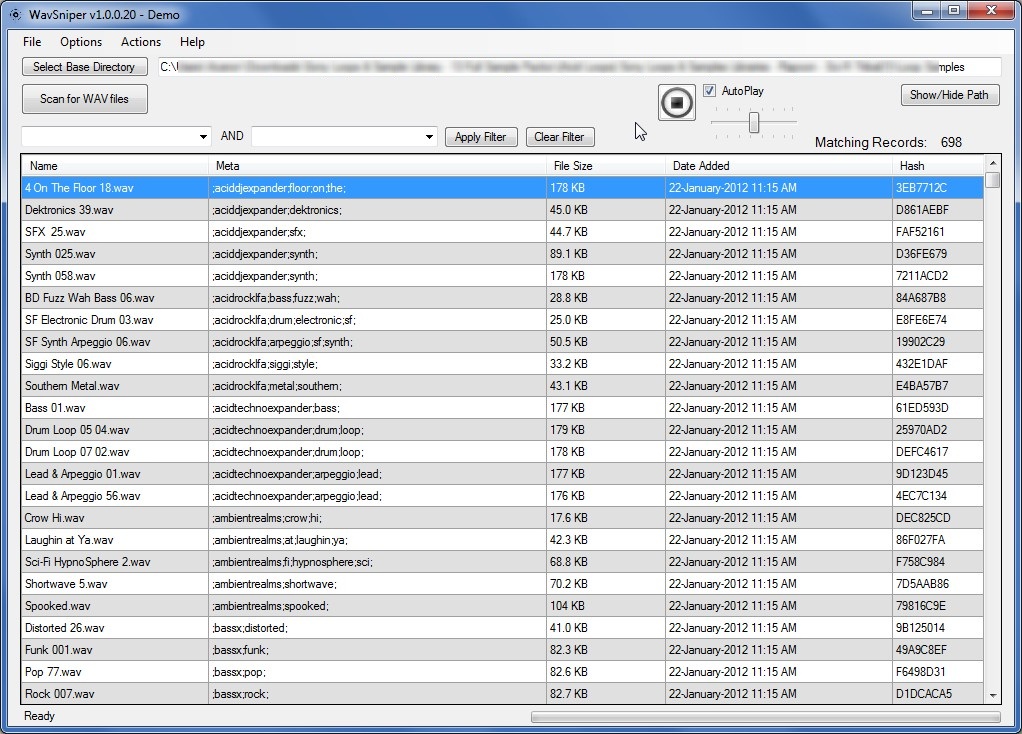
- Simply scan all your sound samples on your Hard Drive with WavSniper, and it will attach appropriate TAGs to your sound files to get you started.
- Quickly preview your samples and easily edit/attach your own TAGs to your sounds, individually, or in bulk.
- Sound file tagging
is done automatically at first, but you are free to make edits as needed.
- How it works...
- Sample discs usually contain countless sub-directories in an attempt to "categorize" sound files. WavSniper automatically scans those directory names (and filenames), and converts those names as TAGs (categories), it then generate a search box prefilled with the various TAGs grabbed from the file-structure.
- This will allow you
to narrow your search by searching by categorized key words, or just
based on a search term.
- Simple Interface...
- Use the drop-down lists to filter your list...
- Right-Click on multiple sounds to batch edit the TAGS
- Right-Click on single sound and click "Open Explorer" and have the file highlighted.
- Middle-Click
on single sound to Drag-and-Drop it into your favourite DAW.
- Easily manipulate the TAG exclusions, remove duplicate sounds..
- Click on a sound file automatically previews the file (audio), and copies it's filename to the clipboard.
- Currently supports WAV and MP3 (ID3 Tagging coming soon)...
- More features to
come!
- WavSniper does NOT
alter your sound files, nor does it reorganize them on your HDD. It
simply makes finding them, and using them easier.
- Compatible with most
Digital Audio Workstation software.
- Currently supports .WAV and .MP3
- Free Download
Copyright 2012 - 74mph Solutions