
Free Software
Free Windows apps I build and keep up to date. No ads, no telemetry, no account, no expiry. Download them and they are yours.
Media Codec Scanner
know what's inside any media file
Every codec, resolution and stream, at a glance.
Media Codec Scanner scans a file or a whole folder of video and audio and tells you exactly what is inside: the codec, resolution, bitrate, frame rate, audio tracks and subtitles. It is a modern rebuild of the beloved AVIcodec, reading today's formats the original never could.
Not code-signed, so Windows may show a caution prompt on first run: choose Keep, then Run anyway. SHA-256 of MediaCodecScanner-Setup.exe: f81abbb6ef32f2b469054f950f9c7193b6e43c593737e52ad117f5226a9aaaa2
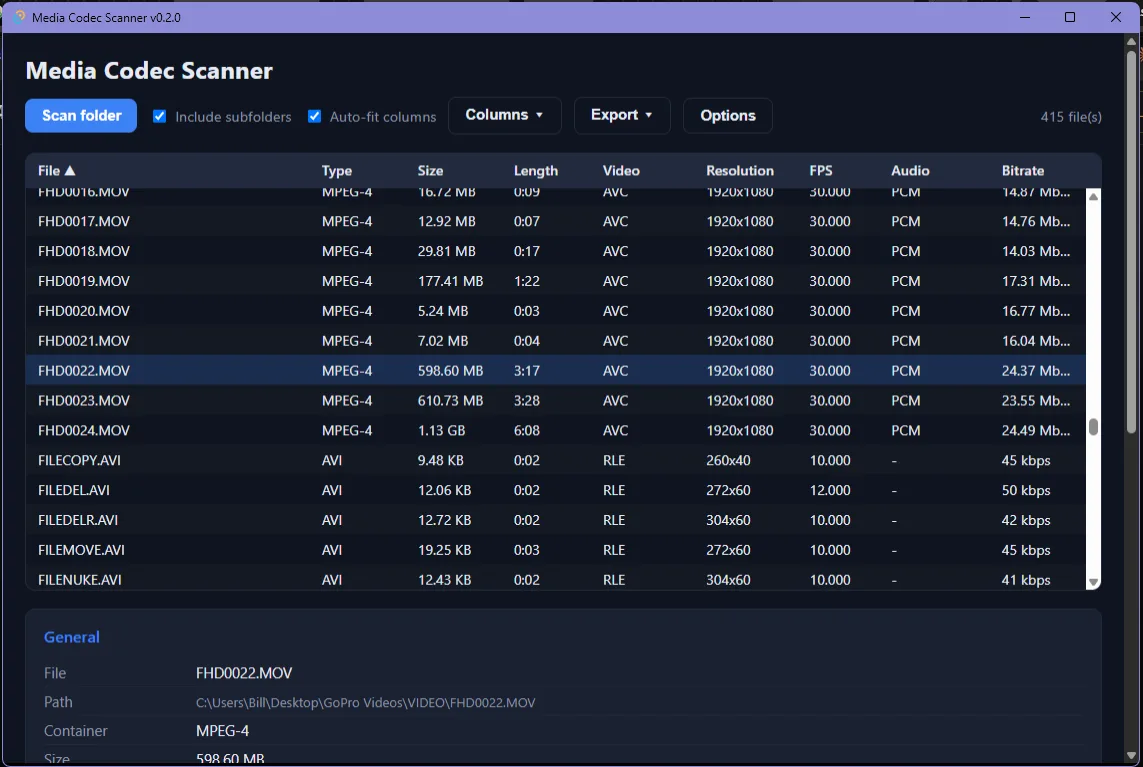
Reads modern and legacy media
MP4, MKV, WebM, HEVC/H.265, AV1, VP9, Opus and FLAC, plus every old AVI, DivX, XviD and MPEG the classic tools handled.
Scan whole folders, fast
Point it at a drive or folder and it walks the tree and analyzes several files at once, with a live progress bar you can cancel.
Sortable, resizable grid
A virtualized table stays smooth across thousands of files. Sort by any column, choose which show, resize or auto-fit.
Codec intelligence
Turns a cryptic FourCC into a friendly codec name and a "where to get it" link, the signature trick of the classic AVIcodec.
Every stream, in detail
Video, all audio tracks and subtitles, with resolution, bitrate, frame rate, aspect ratio, bit depth and HDR format.
Export, open and drop
Export the list to CSV or JSON, double-click a row to open it in your player, or drag files and folders onto the window.
Credits: a modern rebuild inspired by AVIcodec by Philippe Duby, whose freely released source it builds on. Its analysis engine is MediaInfo by MediaArea.net, used under the BSD 2-Clause license.
ScreenStorm
record, zoom, polish, share
Screen capture that looks designed, not dumped.
ScreenStorm is a precision screen recorder and screenshot tool for Windows. Capture a window, region or the whole screen; let the Pro Zoom engine follow your clicks; polish it on a real timeline with overlays, blur and audio; and export a crisp MP4, WebM or GIF.
Installs per-user, no admin rights required. Not code-signed, so Windows may show a caution prompt on first run: choose Keep, then Run anyway. SHA-256 of ScreenStorm-Setup.exe: cd420f2d4cb56e8d78ceee0d0cbb76dbb9cd510c0c9c9c4318e33e47f6745719
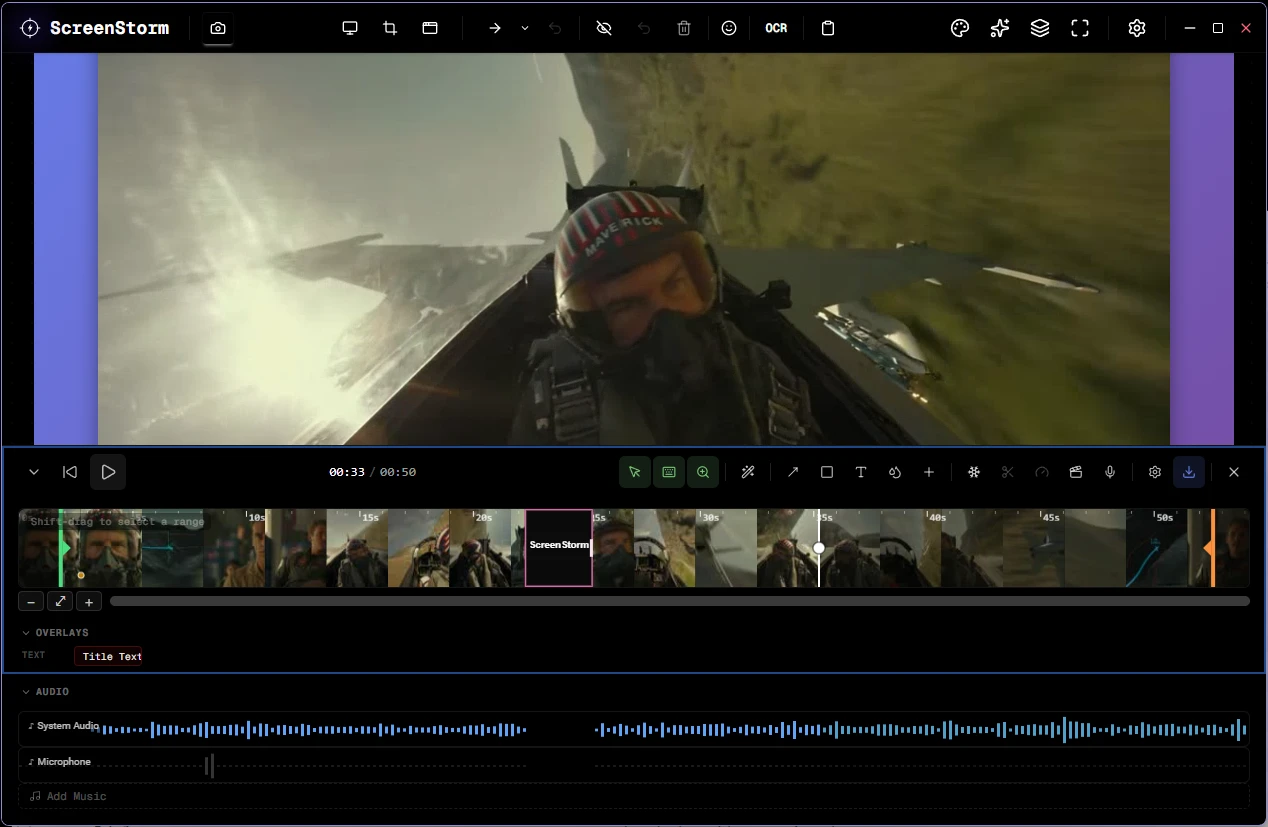
Precision capture
Fullscreen, a region you draw, or a single window, plus an always-ready capture bar (Ctrl+Shift+C). Every shot auto-saves and copies a styled version to your clipboard.
Pro Zoom engine
Auto-Zoom watches where you click and smoothly zooms in to follow the action, with cursor-follow, a dead zone and spring easing. Drop in manual keyframes for full control.
Record with overlays
Capture screen, region or window, GPU-accelerated up to 120 FPS, with an animated cursor and on-screen keystrokes so viewers can follow every step.
A real editing timeline
Trim, scrub and preview with audio waveforms, then add timed blur, text, rectangle and arrow overlays. A per-track mixer balances system audio, mic and music.
Projects you can reopen
Save your whole edit as a self-contained .ssp project, then pick up exactly where you left off, even after the clip has left your recent history.
Export anywhere
MP4 (H.264), WebM (VP9) and clean two-pass animated GIF, with quality presets and hardware encoders (NVENC / AMF / QSV). Recognize on-screen text with a click, too.
Runs on Windows 10 and 11, 64-bit. Built on an MIT-licensed foundation and encodes with FFmpeg. Text recognition uses the Windows OCR engine and the language packs on your system.