Hurricane for Autodesk® AutoCAD®
Hurricane for Autodesk® AutoCAD®
Hurricane for Autodesk® AutoCAD®
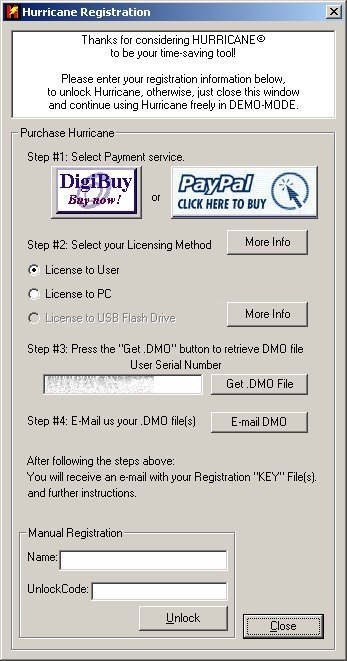
To license Hurricane we need your serial number, which Hurricane saves in a small file with a .DMO extension. We use it to generate the KEY file that unlocks your seat.
Step 1: run Hurricane on the seat you want to license
Start Hurricane at least once, logged in as the user, on the PC, or from the USB drive you want to license. The serial number is based on the licensing option you select: your Windows User Name, your Computer ID, or a USB flash drive.
Step 2: check the serial number
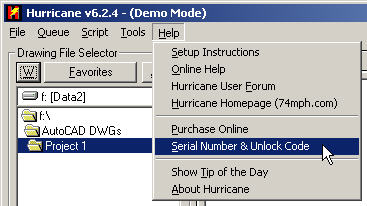
Open Hurricane's Help menu and choose Serial Number & Unlock Code.
Step 3: find the .DMO file
The serial number is saved as
######.DMO(a series of numbers) in Hurricane's KEYS folder, for exampleC:/Program Files/Hurricane/KEYS, or wherever you installed Hurricane (such as a network drive).
Step 4: send it with your order
Attach the .DMO file when you order (see How do I purchase Hurricane?). We send back a KEY file that unlocks that seat; see What is the .KEY file?
Get the .DMO from the right place. The KEY only works for the User Name, PC or USB drive the .DMO file came from. If you run Hurricane under a different login or on a different PC, it creates a different serial number.Several seats or a network install
Buying several seats? Send one .DMO file from each user, PC or USB drive you want to license. In a network installation every user's .DMO file lands in the shared KEYS folder, and the Admin Tool lists them all (see What is a .DMO file?). For a site-wide license, ask about an Enterprise License through the contact page.
Related