Hurricane for Autodesk® AutoCAD®
Hurricane for Autodesk® AutoCAD®
Hurricane for Autodesk® AutoCAD®
Found under the Hurricane "Wizards" menu:
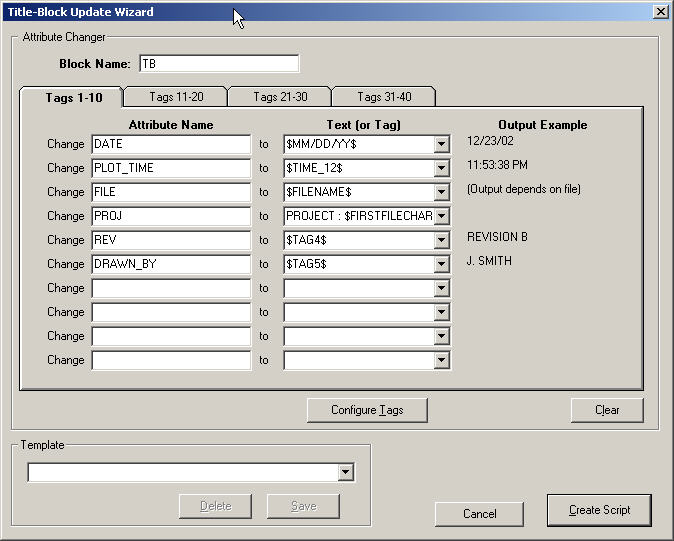
The Title-Block Update Wizard is a tool which will help you write a script to update any title-blocks (that are BLOCKS that contain ATTRIBUTES) in batch format.
Firstly, please see What are User TAGS? to become familiar with Hurricanes "User TAGS" feature.
The Title-Block Update Wizard will allow you to specify the Title-Block name you wish to process in each drawing, and assign particular text (or TAG) to each of the attributes in your title-block.
You may then save the "template" for recall at a later time.
SIDENOTE:
To find the name of the "block" to update, in AutoCAD, select the block, and then type LIST. The block name will appear in AutoCADs text window: (something like this)
BLOCK REFERENCE Layer: "0"
Space: Model space
Handle = 41A3
"TB1" <---- This is your blocks nameTo find the names of the TAGS that you wish to edit in the block, EXPLODE the block (temporarily), and the names of the TAGS will be displayed. Note: Don't confuse "Prompt" values (which appear when you use DDATTE to edit a block), as these are non-unique.
Using USER TAGS, you can have Hurricane create a script that automatically updates any title-block information that may change from drawing to drawing, such as the filename, date, time, sheet number. Using STATIC TAGS (See above) you can easily assign a different description to your title-block, without having to edit your script.
When completed the Title-Block Update Wizard will create a script such as this:
(LOAD "C:/PROGRAM FILES/HURRICANE/LISP/TB_WIZ1.LSP")
;-------------
TB_WIZ1
TB
DATE
$DATE$
;-------------
TB_WIZ1
TB
S
$SHEET$
;-------------
TB_WIZ1
TB
SH_TOT
45
;-------------
TB_WIZ1
TB
FNAME
$FILENAME$
;-------------
TB_WIZ1
TB
DRAWNBY
$TAG5$
;-------------
TB_WIZ1
TB
CHECKEDBY
$TAG6$
;-------------The first line of the script loads a lisp routine that edits the blocks and the remaining portion runs the lisp routine, specifies the blockname, the tag and the value to substitute.
When you press the main Hurricane "CREATE" button, all the TAGS are substituted based on the current drawing, date, time etc, and the final script looks something like below, with the ACTUAL values substituted (shown in bold)
(LOAD "F:/BACKUP/VB PROJECTS/HURRICANE/DELIVERABLES/LISP/TB_WIZ1.LSP")
;-------------
TB_WIZ1
TB
DATE
01/03/02
;-------------
TB_WIZ1
TB
S
101
;-------------
TB_WIZ1
TB
SH_TOT
45
;-------------
TB_WIZ1
TB
FNAME
MACH101
;-------------
TB_WIZ1
TB
DRAWNBY
J. SMITH
;-------------
TB_WIZ1
TB
CHECKEDBY
R. EVANS
;-------------** This Wizard uses AutoLISP, so it needs full AutoCAD or AutoCAD LT 2024 and later. On older LT versions, Hurricane switches it off. See Can AutoCAD LT run LISP? **